
Site Billing Rules and Group Overview
This page explains how FishXCode billing, token groups, and subscription plans work together. Use it as a pre-flight checklist before buying a plan or creating a key: check pricing and plan scope first, choose the right group for the key, then verify real usage in logs and group health status.
Current scope
The current pricing page has 49 models and 14 selectable groups. Models, prices, groups, and availability may change; the pricing page and console are authoritative.
Screenshot Map
| Screenshot | What it explains |
|---|---|
| Subscription plan list | Which plan-card fields affect billing |
| By-number-of-times benefits | Daily limit, total count, reset time, supported models |
| Purchase dialog | What to confirm before payment |
| Create token | How a group is attached to an API key |
| Create token from plan | How teams split plan quota into child keys |
| Token list | How to confirm group, multiplier, model scope, and expiration |
| Group health status | How to verify cost, cache, and incident scope after usage |
1. Three Billing Entry Points
| Entry point | What to read | Best for |
|---|---|---|
| Pay-as-you-go | Model base price, input/output/cache pricing, token group | Balance-based API calls, testing, mixed models |
| Subscription plans | Validity, total quota, daily/monthly limits, applicable group | Team budgets and long-running Codex / Claude usage |
| Token groups | Which models a key can call, resource pool, multiplier | Key creation, project split, team cost attribution |
Read this page together with Subscription Plans: this page explains model prices, multipliers, and groups; the plan page explains purchased quota, validity, request counts, and limits.
2. Pricing Page: Read Plan Cards First
Plan cards help you quickly check quota, validity, daily limits, and special conversion rules.
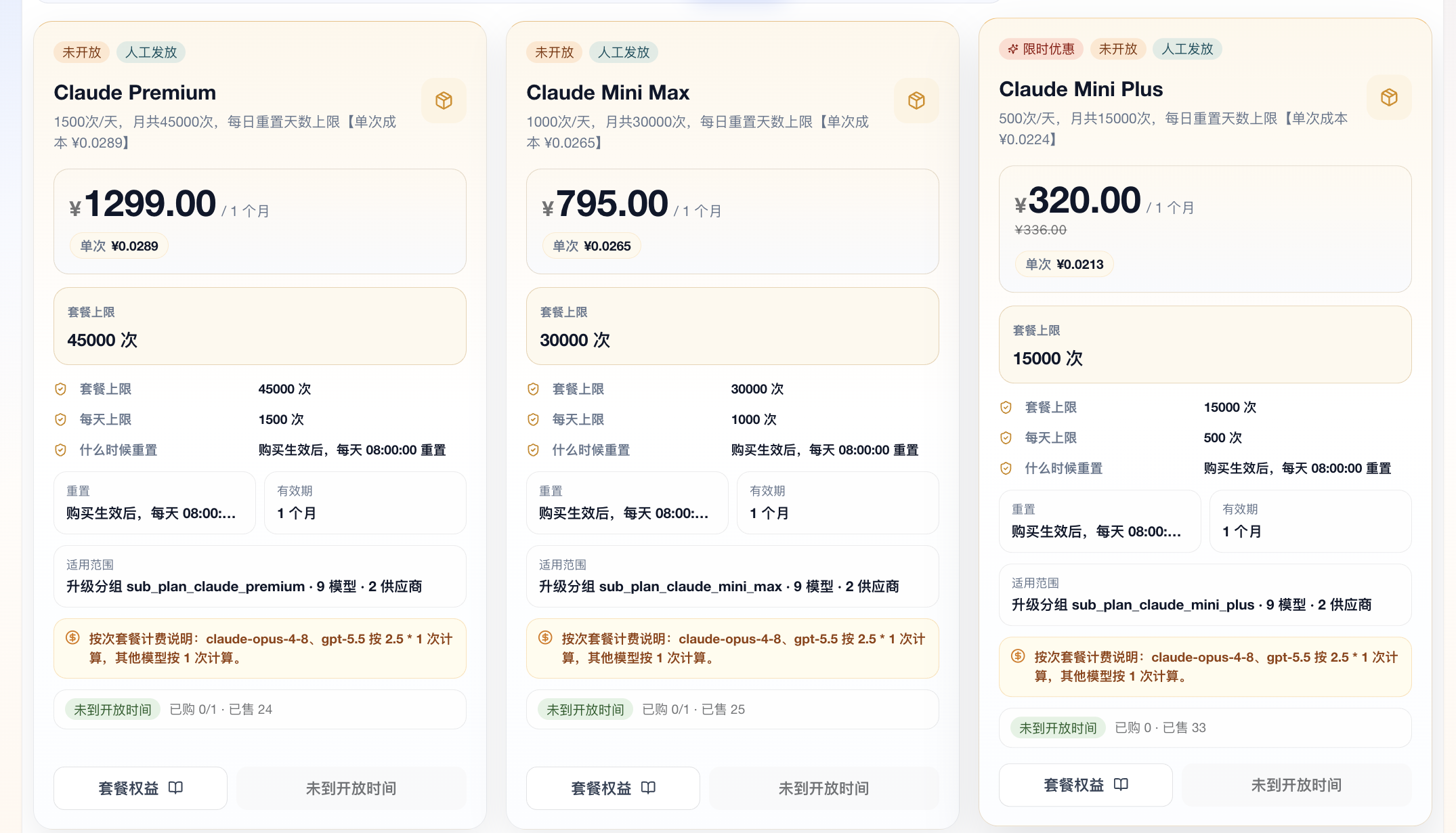
| Field | Meaning | How to read it |
|---|---|---|
| Current price | Purchase price and validity | ¥320.00 / 1 month means one-month pricing |
| Cost per request | Price divided by total count | Compare similar by-number-of-times plans |
| Plan limit | Total quota or total request count | 15000 requests means the plan total limit |
| Daily limit | Max daily usage | 500/day usually blocks until reset after reached |
| Reset time | When periodic limits recover | Example: daily reset at 08:00 |
| Scope | Bound group, model count, vendors | Example: sub_plan_claude_mini_plus · 9 models · 2 vendors |
| Conversion rule | Whether special models count more | Claude Opus 4.8 and GPT-5.5 may count as 2.5 × 1 request |
Example
If a plan says 500/day, 15000/month and marks Claude Opus 4.8 or GPT-5.5 as 2.5 × 1 request, normal successful requests usually count as 1. Those higher-multiplier models count as 2.5. If you only use those models, about 200 successful requests can consume a 500/day limit.
3. Plan Benefits: Check Limits, Reset, and Models
The plan benefits view explains what you can use after purchase.
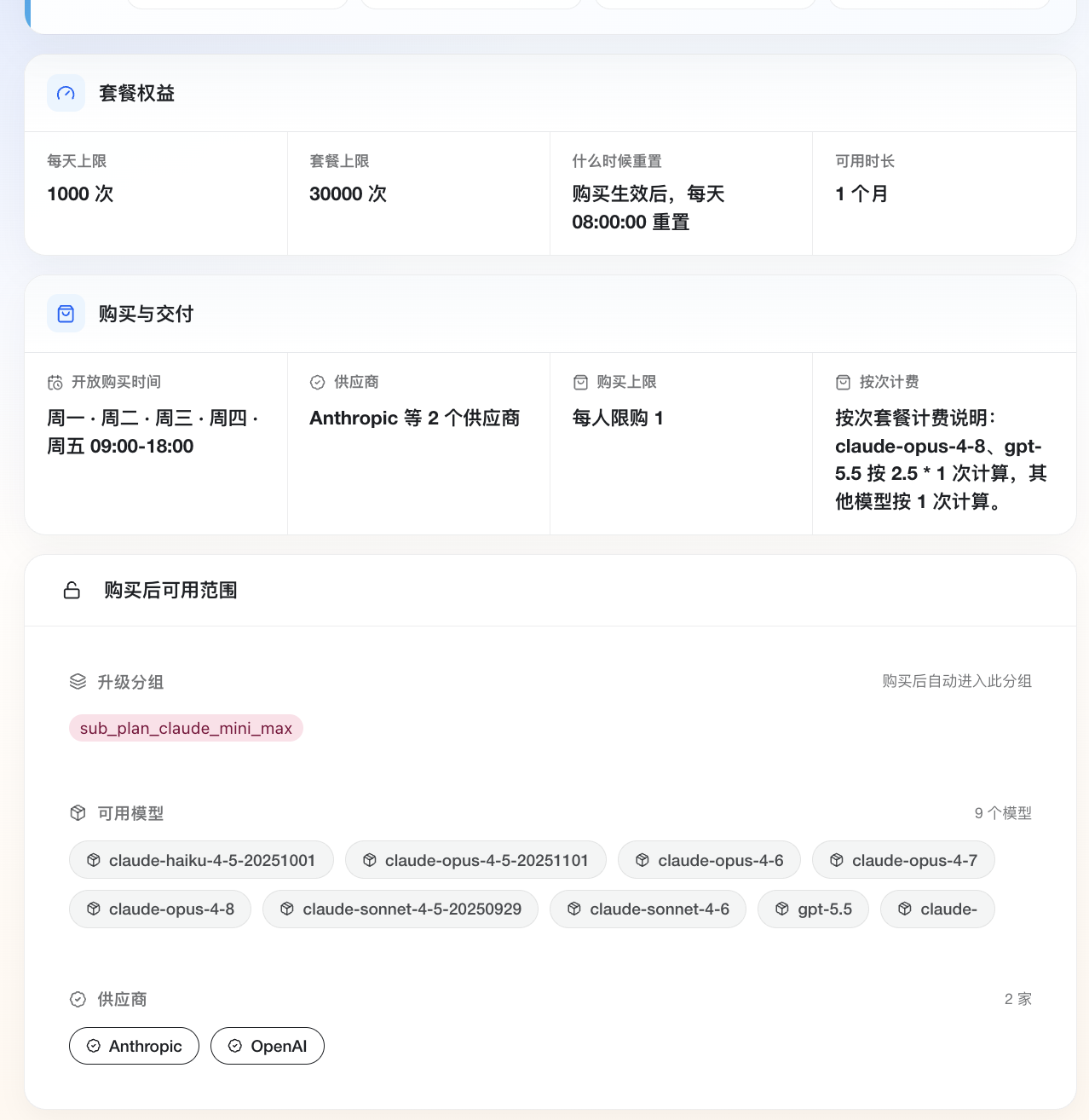
Check daily limit, total plan limit, reset time, purchase window, vendors, supported models, and the upgrade group automatically entered after purchase.
Read plans and groups together
The plan page tells you quota and limits. The group tells you models and routing. If a plan supports an upgrade group but your actual key is not bound to that plan or group, requests may still use balance or fail with a permission error.
4. Purchase Dialog: Confirm Before Payment
The purchase dialog is the final checkpoint for price, validity, delivery mode, and payment.
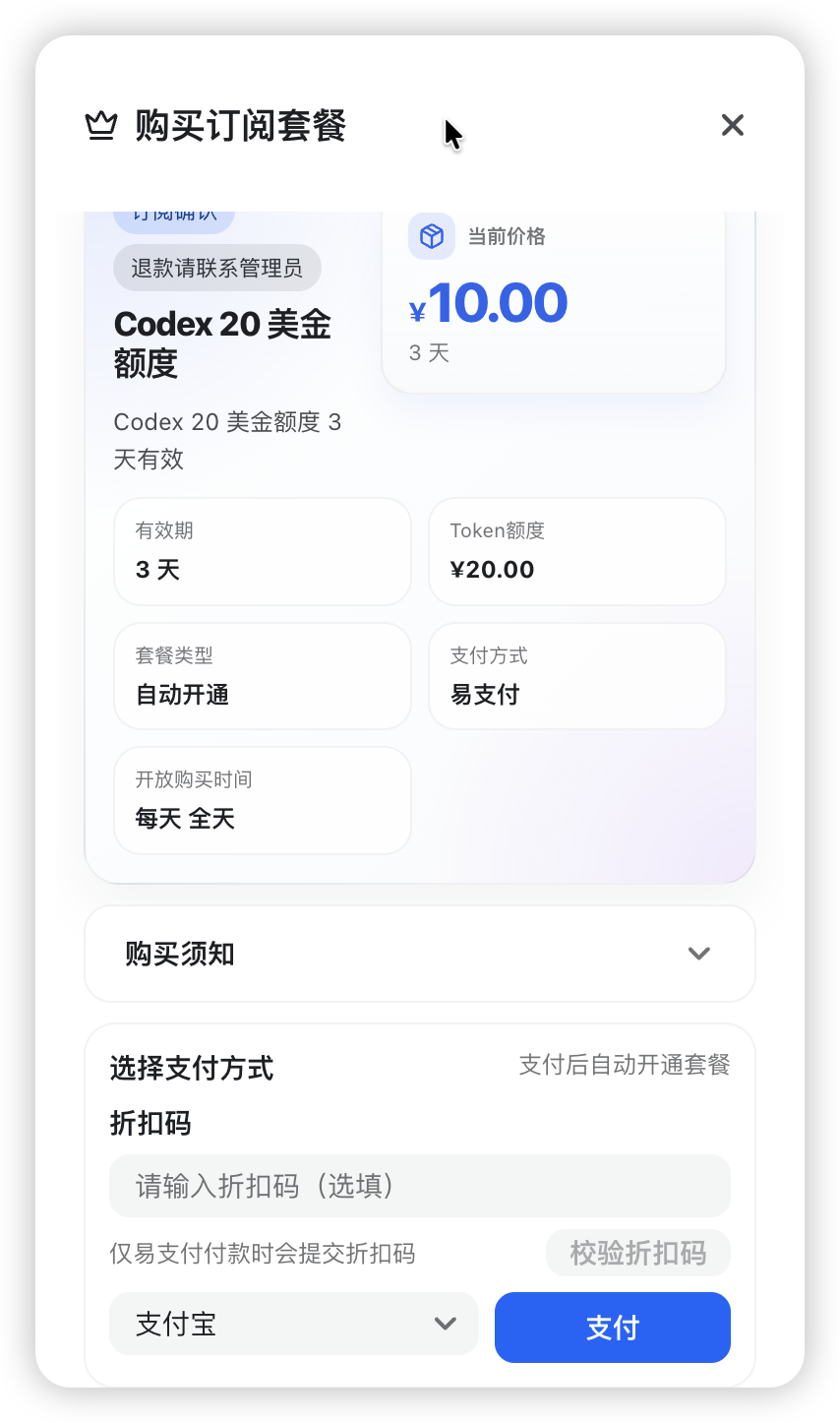
| Field | Why it matters |
|---|---|
| Current price | Avoid buying the wrong plan |
| Validity | Plan benefits expire after this period |
| Token quota / count | Defines total usable amount |
| Plan type | Auto-opened or manually delivered plans behave differently |
| Payment method | Confirm the actual payment channel |
| Purchase notes | Refund, delivery, purchase limits, and support follow the page |
5. Pay-As-You-Go Usage
Pay-as-you-go means using account balance directly without buying a fixed plan. It is useful for tool setup, low-frequency usage, mixed-model experiments, or deciding which plan to buy later.
Basic flow:
- Check which groups support the target model on the pricing page.
- Create a normal token in Console -> Token Management and choose the right group.
- Configure the key in Claude Code, Codex, Cursor, RooCode, or your own code.
- Each successful request deducts balance based on model pricing, input/output tokens, cache hits, and group multiplier.
- Verify real usage in Console -> Usage Logs.
Estimated usage ~= model base usage × group multiplier + output/cache differencesBalance and plans differ:
| Type | Behavior | Best for |
|---|---|---|
| Pay-as-you-go balance | Deduct as used; calls stop when balance is insufficient | Testing, mixed models, low-frequency use |
| Codex plans | Usually controlled by validity and quota | Codex / GPT coding teams |
| By-number-of-times plans | Count successful requests and may have daily limits | Fixed request-count budget |
| ClaudeMax plans | Account benefits and Claude Code usage path | Claude Code official-account scenarios |
Balance does not bypass groups
Having balance does not mean every key can call every model. Model availability still depends on the token group.
6. Token Groups: Group Determines Key Scope
A token group defines available models, billing multiplier, and upstream resource pool for that API key.
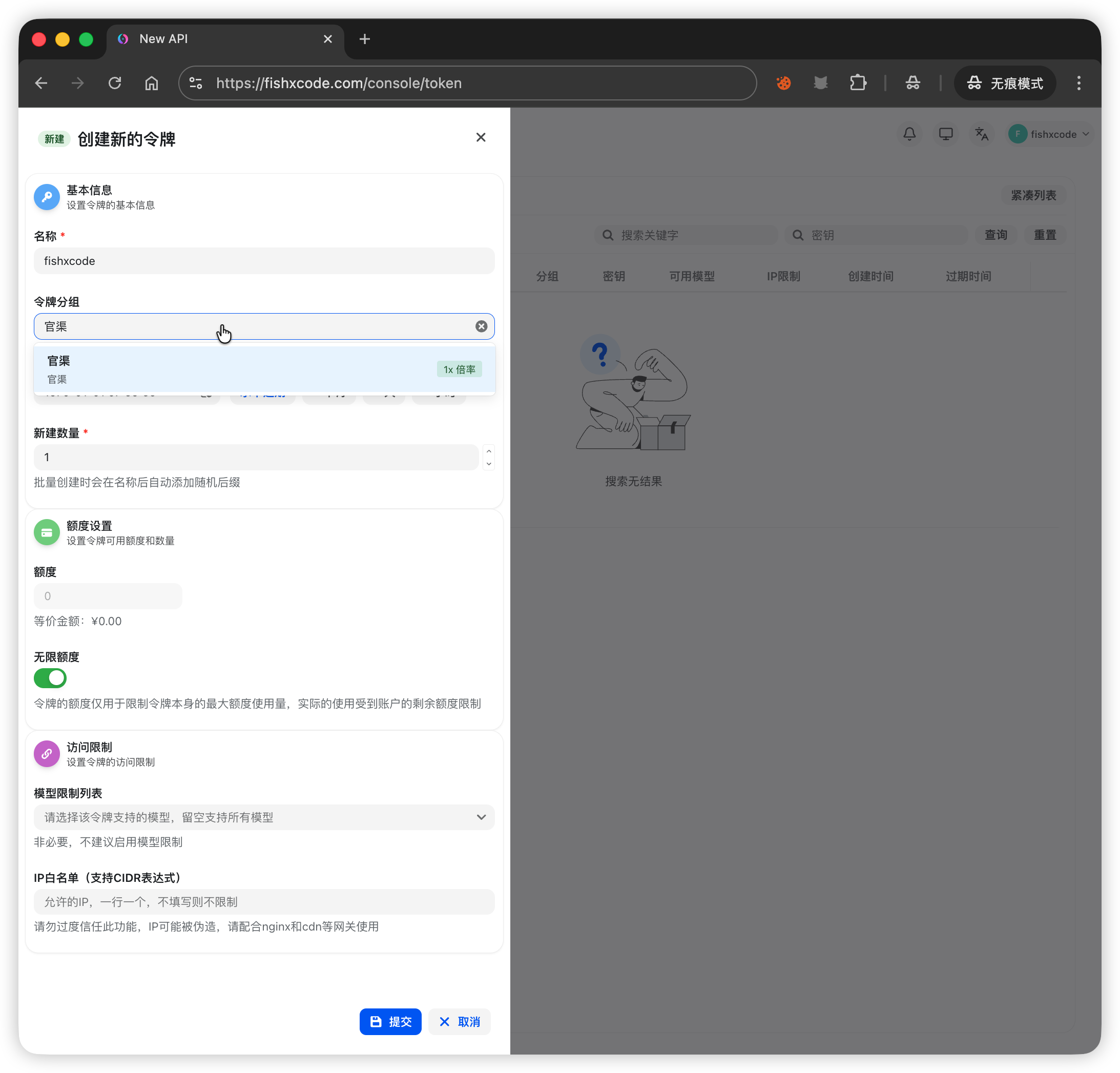
When creating a normal token, check the group, quota setting, optional model allowlist, and IP allowlist. If the group is wrong, you may see model not found, model not available, permission errors, unexpected billing, or plan/balance confusion.
7. Plan Tokens: Create Team Keys from a Plan
After purchasing a plan, the system may generate a plan access token. You can also create child tokens from that plan for members, projects, or services.
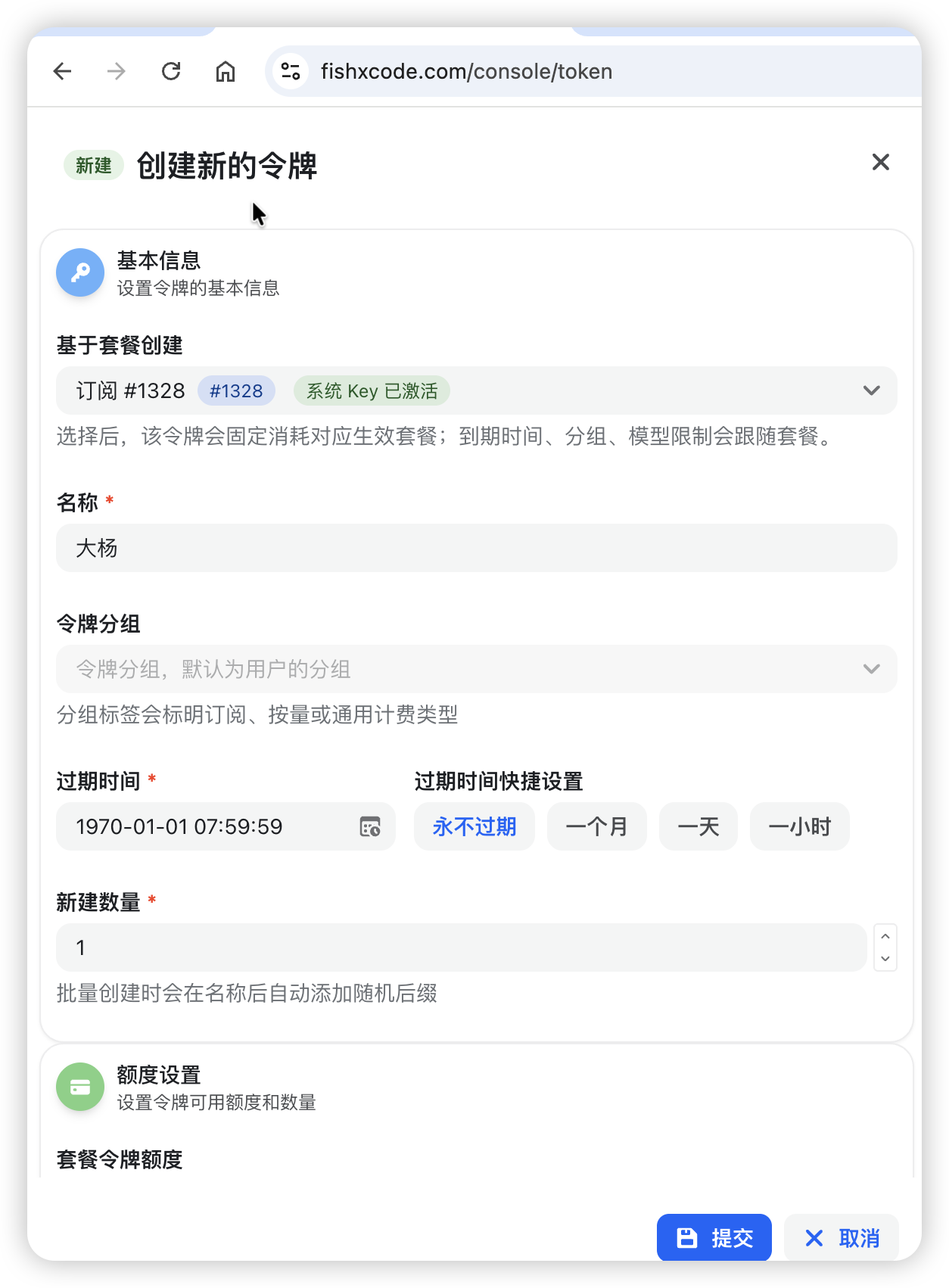
| Field | Meaning |
|---|---|
| Create from plan | Bind the token to a plan; expiration, group, and model scope follow the plan |
| Name | Use member, project, or service names for log filtering |
| Token group | Usually follow the plan or user group; avoid unrelated groups |
| Expiration | Usually should not exceed plan validity |
| Plan token quota | Limit how much plan quota this child key can consume |
Team example
For a Codex plan shared by five members, create one token per member instead of sharing one key. Usage logs and group health status will then show who consumes more, who has more errors, and which project needs limits.
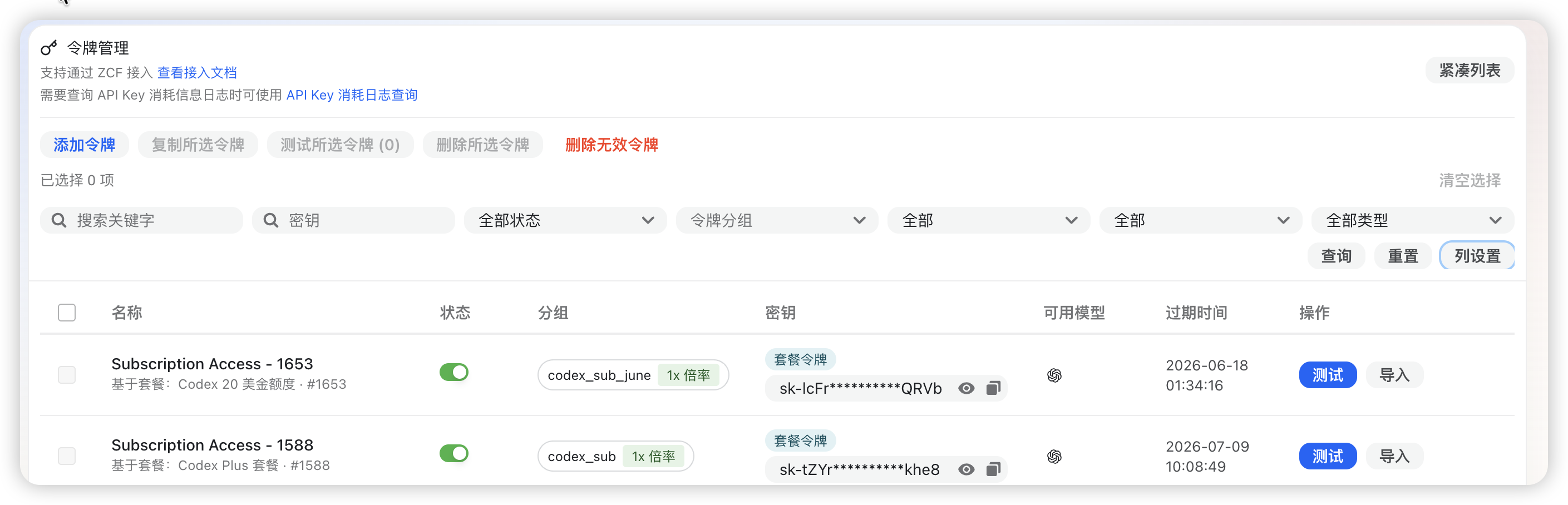
The token list shows group, multiplier, available models, and expiration:
8. Current 14 Groups
This table follows the usable_group scope shown on the pricing page. Exact models, multipliers, and availability follow the pricing page.
| Group | Description | Suggested use |
|---|---|---|
OpenRouter | Official OpenRouter aggregation channel; supports Claude, Codex, and other model families. | Unified multi-family access |
cc-max | Official Claude Code API channel; prioritizes stability. | Stable Claude Code production |
cc_export | Claude Code external group; not limited to a specific client. | Custom tools and third-party clients |
cc_max | Claude MAX self-managed pool; recommended in Claude Code or official plugins. | Claude Code or official plugins |
claudemax_x20 | ClaudeMax x20 official subscription account group. | Team or heavy ClaudeMax usage |
claudemax_x5 | ClaudeMax x5 official subscription account group. | Individual or light ClaudeMax usage |
codex_plus | Codex Plus external pool for frequent coding and tool calls. | High-frequency coding tasks |
codex_pro | Codex Pro external pool for frequent coding and tool calls. | More stable Codex / GPT coding |
codex_sub | Codex subscription standard pool with cache-friendly usage. | Codex subscription standard pool |
codex_sub_june | New Codex subscription pool for GPT-5.x / Codex models. | New GPT-5.x / Codex models |
deepseek | Official DeepSeek channel. | DeepSeek models |
default | General pay-as-you-go group for open site models. | Testing and normal requests |
gemini | Gemini group for multimodal, long-context, and frequent usage. | Gemini and multimodal tasks |
grok | xAI Grok group for chat, reasoning, and vision. | Grok tasks |
9. Multiplier Examples
| Model base usage | Group/model multiplier | Estimated deduction |
|---|---|---|
| 10 credits | 1x | 10 credits |
| 10 credits | 0.5x | 5 credits |
| 10 credits | 0.1x | 1 credit |
| 10 credits | 2.5x | 25 credits |
If a request costs 8 credits at base price, 0.5x is about 4 credits and 2.5x is about 20 credits. Cached long-context requests may be cheaper for cached parts; usage logs are the final source of truth.
10. Verify Real Usage After Calls
Do not rely only on estimates. Check Console -> Usage Logs after calls. For team and plan usage, use Group Health Status to see whether the issue belongs to one key, one user, or an entire group.
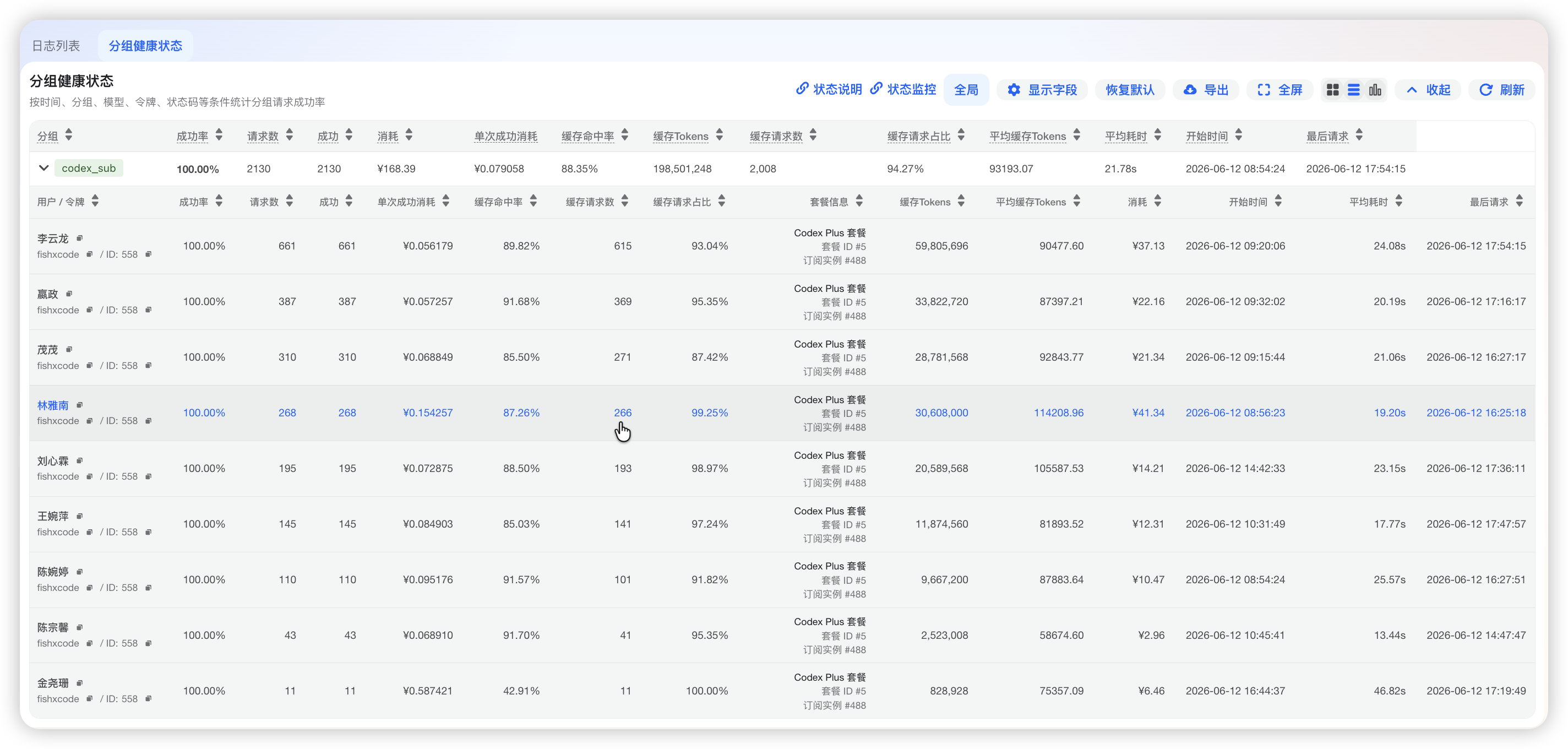
Group health status helps answer which group consumes the most, whether only one member is abnormal, whether cache is effective, and whether a resource pool is failing.
11. Quick Selection Guide
| Scenario | Start with | Why |
|---|---|---|
| Unsure what to use | default or console recommendation | Verify configuration first |
| Stable Claude Code | cc-max, cc_max, ClaudeMax groups | Matches Claude Code usage |
| Custom Claude clients | cc_export | Works with third-party tools |
| Codex / GPT coding | codex_plus, codex_pro, codex_sub_june | Designed for code and tool calls |
| Unified multi-family access | OpenRouter | One entry point for multiple model families |
| Gemini or multimodal | gemini | Covers Gemini models |
| Grok models | grok | Covers Grok chat, reasoning, and vision |
| DeepSeek models | deepseek | Covers DeepSeek official channel |
| Team/project split | Separate tokens | Easier quota control and troubleshooting |
12. Troubleshooting
- Confirm the token group includes the target model.
- Check balance, plan validity, daily/monthly limits, and total quota.
- Open Console -> Usage Logs and filter by time, model, token, group, or request ID.
- Compare Group Health Status to distinguish token issues from group resource issues.
- When contacting support, provide order number, token name, group, model, request time, and request ID.